Characters are the Each character is set up in a character file and are managed from the Character Manager.
Character Manager
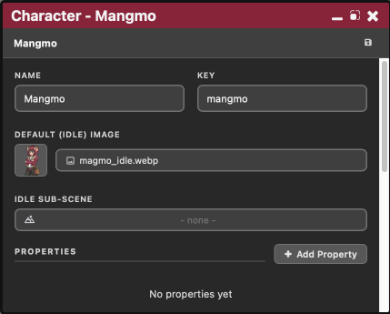
- Key: the identifier used everywhere at runtime (
[SetCharacter(key)],Assets.GetCharacter(key)). - Name: the display name shown in-game, e.g. in the name box.
- Notes: free-text notes for your own reference, not shown in-game.
- Default (Idle) Image: the character's default portrait, used when no variant is specified.
- Idle Sub-Scene: an optional sub-scene to show instead of, or alongside, the idle image, for characters with more than a static portrait (see Complex Characters).
- Variants: named alternate images, like expressions or outfits, each with its own image and variables.
- Tags: free-form labels for organizing and filtering characters.
Using a character in dialogue
[SetCharacter(alice)]
[SetCharacter(alice, variant=smiling)]
SetCharacter fires a SetCharacter event with the character key in event.args[0] and, if given, the variant name in event.kwargs.variant.
It's up to the scene's script to actually swap the displayed image. A typical handler looks up the character with Assets.GetCharacter, picks the variant image if event.kwargs.variant was set, and swaps it into the portrait element.
Chapter logic can read and change a character's variables with {character(alice)} and $char.name (see Logic).
Scripting
//You can get data from a character in your scripts by using the character's key.

const alice = Assets.GetCharacter("alice");

// You can then extract the information you need
alice.name;                       // gets the character's name
alice.image;                      // default idle image path

// And access different variants of the character
alice.variants["smiling"]?.image; // a specific variant's image

// Variables hold their current values, including changes made by chapters
alice.variables.trust;