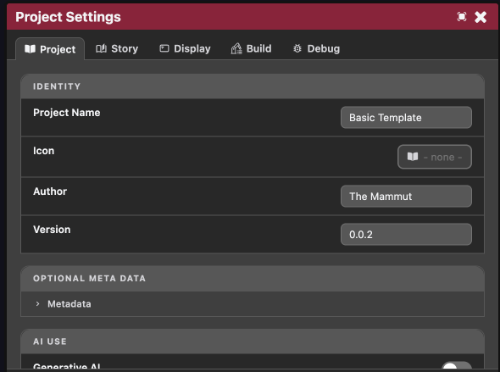
Project Settings cover all the settings that live inside the project itself (saved to project.json in the root folder of the project). This is opposed to Preferences which is for user/machine specific settings.
Changes here don't autosave. A Save Settings button at the bottom stays disabled until something's changed.
Project tab
Identity
This hold the general settings for the project, including: Name, Icon, and Version number
Meta Data
This holds all the additional data that is not required, but useful to have, including: Description, Website, Contact Email, Credits, and Tags.
AI Use
This is a toggle to tag this game is having used AI assets in its creation. This does nothing to the game, just allows anyone hosting the game to see that this flag is set.
Content warnings
This is a list of common content warnings that your game may have. This allows players of games to filter out possible games based on certain themes that they do not wish to see.
These include: Sexual Content, Drugs & Alcohol, Violence, Horror, Supernatural, and Mental Health.
Story tab
Sets Sshortcuts used while authoring chapters in the Chapter Node Editor:
- Auto-connect nodes with: what markup gets inserted when you drag-connect two nodes in the story graph. Choose between an inline
<link>tag, a[LinkOption(...)], or an[AutoLink(...)]. - Ctrl+Enter inserts / Shift+Enter inserts: the text inserted into a node when you press those shortcuts while editing it. Defaults to
[AwaitClick()]and[AwaitClickClear()].
Display tab
Sets the Reference Resolution for the game, alongside the default background colour.
Build tab
- Start Scene: which scene the game boots into, picked from every scene in the project.
- Splash Screens: the stack of scenes (and built-in Mammut/"Made By Humans" splashes) shown before the start scene, in order, each with its own auto-advance duration. A duration of
0means the scene has to callSceneManager.ShowNextStartScene()itself to move on.
Debug tab
Rebuild File Metas, which re-scans every file in the project and rebuilds its metadata index. Useful if something's not showing up correctly after files were moved or edited.