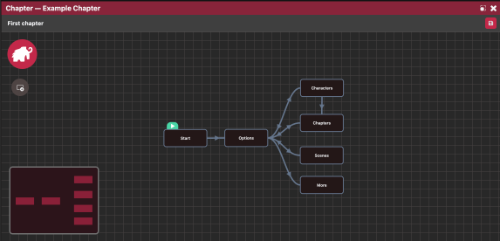
Dialogue lives in chapters (.mmcp), made up of nodes. Each node is a block of text with its own markup, edited in the Node Editor window.
View options
The menu button to the right of the chapter's save button opens the view options. Show Zoom Controls and Show MiniMap turn the canvas's zoom buttons and minimap on or off. They're editor settings, saved on this computer rather than in the project, and both are hidden anyway when the window is narrow.
The toolbar
The Node Editor's toolbar gives you one-click inserts for common markup, grouped into sections:
- Format: insert a link, or wrap selected text in a named text style.
- Actions: AutoLink, LinkOption, Pause, TextSpeed, AwaitClick, AwaitClickClear, Switch Scene, trigger a custom event, and, if your project has characters, a character menu for inserting
[SetCharacter(key)]tags, with variant options inserting[SetCharacter(key, variant=value)]. The menu shows character display names but inserts their actual key, so renaming a character's display name later doesn't break existing dialogue. - Audio: play/stop voice, music, ambient, and SFX.
- Logic: loops, print/set a variable, insert a declared project variable, conditionals, and log statements.
- Other: comments and miscellaneous inserts.
Right-clicking in the editor gives you the same character, style, and variable insert options through a context menu.
Revealer markup
Dialogue text is plain text plus bracketed action tags and a few other constructs, all handled by the Revealer engine at runtime:
[SetCharacter(alice)]
Hello there!{$playerName != undefined ? ", " + $playerName : ""}
[LinkOption(node_yes, Sounds good)]
[LinkOption(node_no, No thanks)]
[AwaitClick()]
For the full syntax see following pages:
- Actions: every
[ActionName(...)]tag, built-in and custom. - Logic: variables, conditionals, loops,
{$var}/{print}/{set}. - Formatting: style tags, inline links, comments.
Handlers registered via Revealer.Register receive a single event object: event.name, event.args, event.kwargs, plus event-specific fields. See Coding.