The dockable panel at the bottom of the editor for browsing, creating, and managing your project's files.
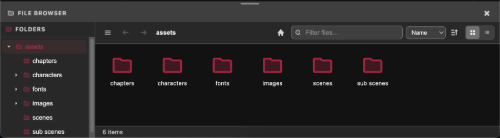
Layout
- A Folders sidebar on the left: a tree rooted at
assets - The main panel on the right shows the contents of the folder you're currently in
- A breadcrumb trail shows the current path, with each segment clickable
- A Filter files… search box filters the current folder's contents live, by name.
- A Sort dropdown (Name, Type, Modified, Size) plus an ascending/descending toggle controls ordering.
File actions
Available from the hamburger Menu button in the topbar, or by right-clicking a file, folder, or the empty background:
- Open, Edit as Text, Duplicate, Rename, Download, Delete.
- Create: Folder, Scene File, Chapter File, Character File, Scene Script.
- Upload Files, and drag-and-drop from your OS, including whole folders.
- Show Hidden Files toggle.
Exporting
Files or folders can be exported easily for use on other projects
Downloading
File can be downloaded by right clicking on the file(s) or folder(s) and selecting Download and the file(s) will be downloaded as a zip.
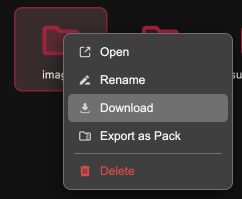
For exporting files for use in other distribution in other people's projects see Mammut Packs.
Importing
Various file a can be imported and converted into compatible files.
- Mammut Packs
- RenPy scripts
- Twine files